
5. Calling the openCOSMO-RS_conformer_pipeline program! 🤖#
Explanation of the code:
python ConformerGenerator.py –structures_file file.inp –cpcm_radii cpcm_radii.inp –n_cores 2
ConformerGenerator.py is code to produce the files
file.inp is the input file that we created earlier, the name can change. For our example it will be water.inp
cpcm_radii.inp specifies the radius size of the atoms
n_cores 2 specifies the number of CPU cores to be used for the execution of the script.
Go to the terminal / command prompt in your computer and go to the directory where the repository is using the following command line:
cd”C:\Users\xx\xx\openCOSMO-RS_conformer_pipeline”
Remember to change the address to the one where you have the program located
Call the program:
python ConformerGenerator.py –structures_file file.inp –cpcm_radii cpcm_radii.inp –n_cores 2
Remember to change the name of our file.inp to the one we saved, in this case let’s use: water.inp
Since our file is in a different directory than our program, we need to specify the whole address
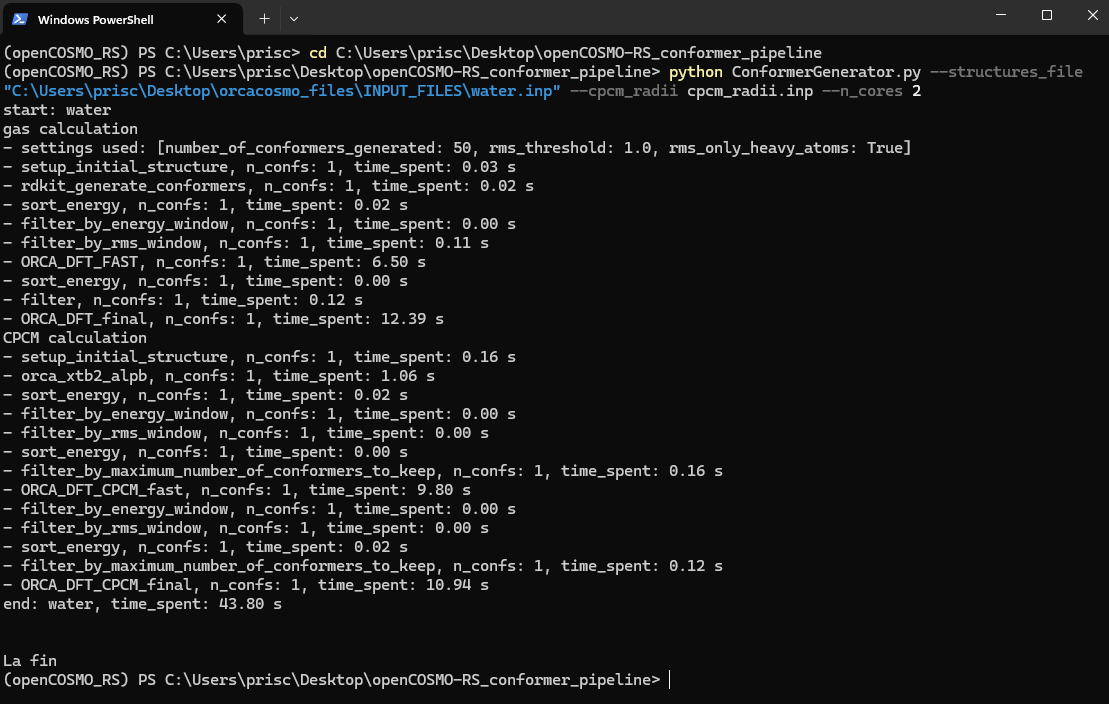
Click enter and you will see a series of steps where it explains that the program is running, at the end you should see the words La fin. That means that the program ran completely and there were no issues.
Here is an example of how it should look like:
🛑 Things to consider 🛑#
If you go to the openCOSMO-RS repository, you will see a folder with the name of the molecule we created, in this case water.
Before running the code again, drag the file outside the folder and save it in another folder where all the .orcacosmo files are gonna be, so we have everything in order. Afterwards, you can run the program again with the other input file we created: two_molecules.inp